
Mouse Touchpad for Big Phone2.5 - Get APK
You'll be able to download in few seconds.
Publisher Description
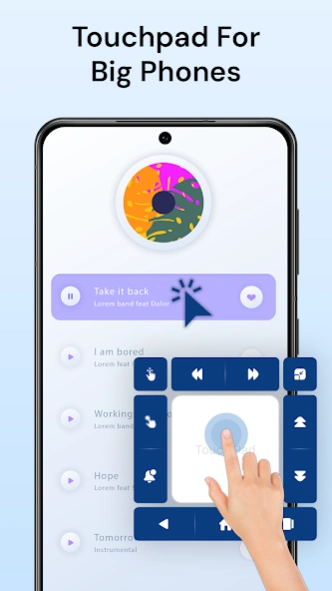
Mouse cursor touchpad for big phone & tab. One-handed mode and smart shortcuts.
Control your large screen easily with Mouse Touchpad for Big Phone.
This app adds a computer-like 🖱️ mouse cursor touchpad so you can use your big phone or tab with one hand 🤚, even if part of the screen is hard to reach or damaged .
Move your finger on the touchpad to move the cursor on screen, then tap, long press, swipe or drag where the cursor points. It feels like a touchpad mouse for your phone and is ideal as a big phone mouse, mobile cursor and one-handed mode helper when the screen is too tall or some area is not working.
With this mouse touchpad for mobile 📱 you get full control without stretching your thumb or pressing physical buttons again and again.
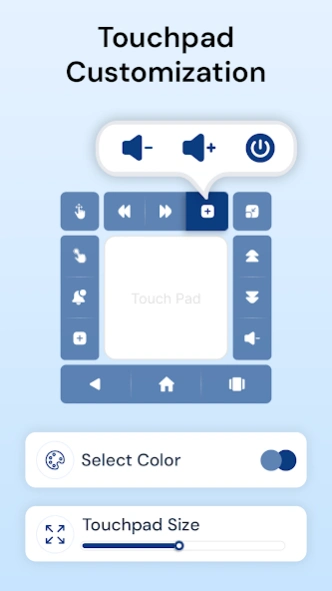
🎛️ TOUCHPAD CUSTOMIZATION
Fine-tune the touchpad for your big screen cursor control:
• Adjust touchpad size
• Change transparency so content stays visible
• Set background color to match your style
• Customize action buttons: position, shape and spacing
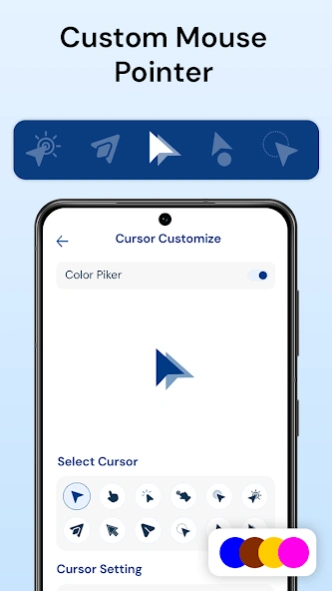
🖱️ CURSOR CUSTOMIZATION
Create the perfect mouse pointer for Android phone:
• Change cursor size for better visibility
• Choose cursor color and icon
• Adjust cursor speed for fast or precise movement
✨ MINIMIZE BUBBLE
Hide the touchpad when you don’t need it and bring it back instantly:
• Minimize to a movable bubble on the edge of the screen
• Change size, color, icon and transparency
• Drag the bubble anywhere so it never blocks important content
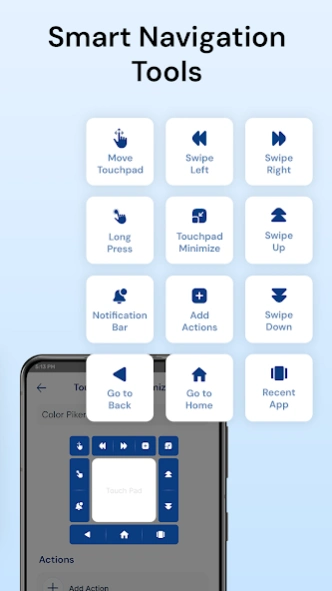
⚡ POWERFUL ACTION BUTTONS
Use action buttons around the touchpad to perform quick actions with one tap
• 👆 Long press at the cursor position
• ↔️ Swipe up, down, left and right
• 🫷 Drag items with long press + move
• 🔔 Open notification panel
• 🏠 Back • Home • Recent apps
• 📸 Take screenshots
• 🎚️ Volume up & down
• 🔒 Turn screen off or lock
• 🔌 Open power dialog (supported versions)
• 🎯 Move or minimize the touchpad
🎨 COLOR AT CURSOR POINT
Unique feature ⭐
See the color under the cursor point on the screen.
Use it like a simple color picker eyedropper while browsing, designing or editing images.
📱 PERFECT FOR BIG PHONES, TABS & DAMAGED SCREENS
Mouse Touchpad for Big Phone is ideal when you need:
• Touchpad for big phone & tab
• Big phone cursor or big screen cursor
• One-handed mode mouse pointer
• Alternative control for cracked or damaged touch screen
🔐 ACCESSIBILITY SERVICE :
This app uses the Accessibility Service to help you control your device more easily by performing user-initiated actions such as tap, swipe, and click on your screen to enable core features and automation; the service is activated only when you use these features and is not used to monitor, collect, store, or share any personal or screen data.
Install Mouse Touchpad for Big Phone now and enjoy a smart mouse pointer app, touchpad mouse and one-handed mode solution for your big-screen smartphone or tablet.
About Mouse Touchpad for Big Phone
The company that develops Mouse Touchpad for Big Phone is Miled Apps Studio. The latest version released by its developer is 2.5.
To install Mouse Touchpad for Big Phone on your Android device, just click the green Continue To App button above to start the installation process. The app is listed on our website since 2026-01-30 and was downloaded 0 times. We have already checked if the download link is safe, however for your own protection we recommend that you scan the downloaded app with your antivirus. Your antivirus may detect the Mouse Touchpad for Big Phone as malware as malware if the download link to big.phone.mouse.ultimate.mouse.pointer is broken.
How to install Mouse Touchpad for Big Phone on your Android device:
- Click on the Continue To App button on our website. This will redirect you to Google Play.
- Once the Mouse Touchpad for Big Phone is shown in the Google Play listing of your Android device, you can start its download and installation. Tap on the Install button located below the search bar and to the right of the app icon.
- A pop-up window with the permissions required by Mouse Touchpad for Big Phone will be shown. Click on Accept to continue the process.
- Mouse Touchpad for Big Phone will be downloaded onto your device, displaying a progress. Once the download completes, the installation will start and you'll get a notification after the installation is finished.
Program Details
System requirements
Download information
Pricing
Version History
version 2.5
posted on 2026-01-30
Bugs Fixed.
Crash Solved.
version 2.4
posted on 2026-01-27
New User Interface.
New Features.
version 2.0
posted on 2025-08-26
Bugs Fixed.
version 1.3
posted on 2021-09-21
Minor Bugs Fixed.
Disclaimer
External Download
We do not host Mouse Touchpad for Big Phone on our servers. We did not scan it for viruses, adware, spyware or other type of malware. This app is hosted by Galad and passed their terms and conditions to be listed there. We recommend caution when installing it.
The APK Download link for Mouse Touchpad for Big Phone is provided to you by apps112.com without any warranties, representations or guarantees of any kind, so access it at your own risk.
If you have questions regarding this particular app contact the publisher directly. For questions about the functionalities of apps112.com contact us.
